SCORING WOODWINDS
Starting at: $179.00 28% Off
Or 4 Payments 0% APR $44.75
Modern Scoring Woodwinds
Starting at: $179.00 28% Off
Or 4 Payments 0% APR $44.75
4 Families • 12 Instruments
16 Chairs
MSW – Where Expression Begins
MSW Core: the orchestra’s most essential woodwinds – 9 instruments meticulously captured to deliver stunning realism, remarkable flexibility, and musical performances
that simply feel alive.
Included in Modern Scoring Woodwinds
Focus on the Music. We’ll Handle the Woodwinds.
The WW Ensemble Patch puts an entire orchestral woodwind section at your fingertips — all in a single patch. With instruments and articulations thoughtfully layered across their natural ranges and balanced for you, there’s no need to juggle individual patches or worry about mixing and orchestration.
Just play, compose, and let the music flow.
Meet MSW Expanded
MSW Expanded features an extraordinary collection of 7 additional woodwinds, specialty articulations, and performance tools designed to inspire creativity beyond conventional orchestration.
Included in Modern Scoring Woodwinds Expanded
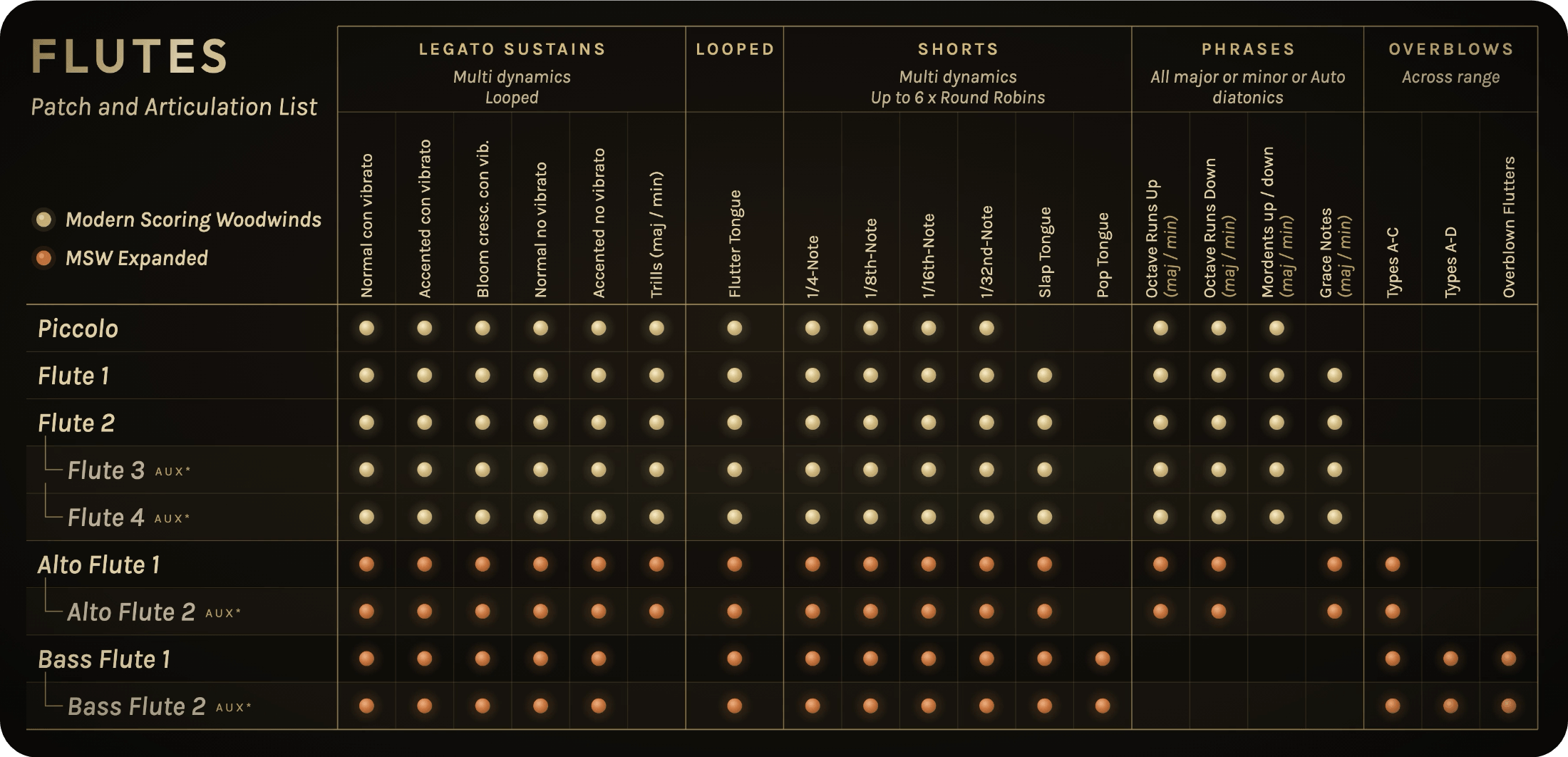
Patches & Articulations
COMPLETE FAMILY CHARTS

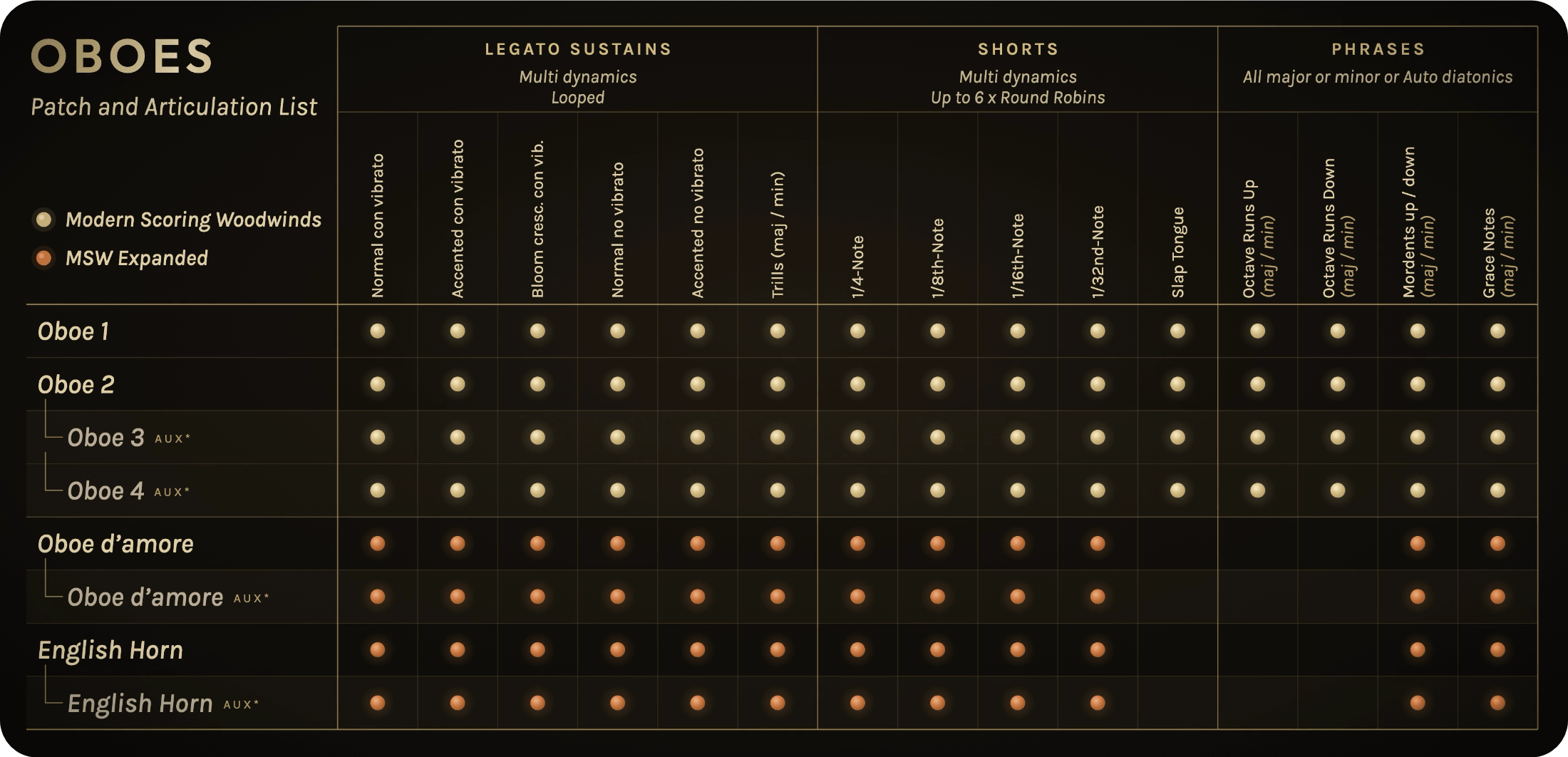

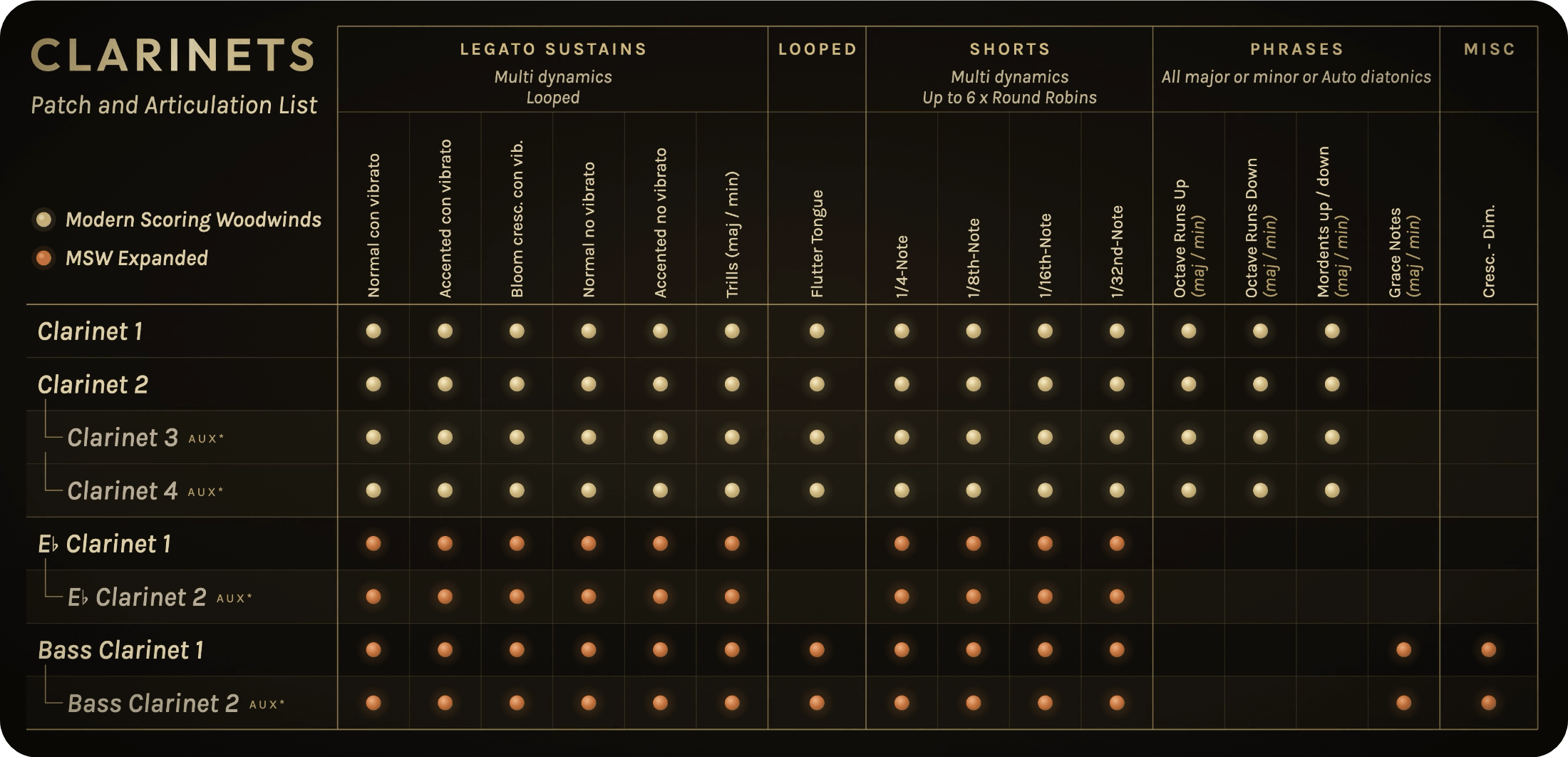

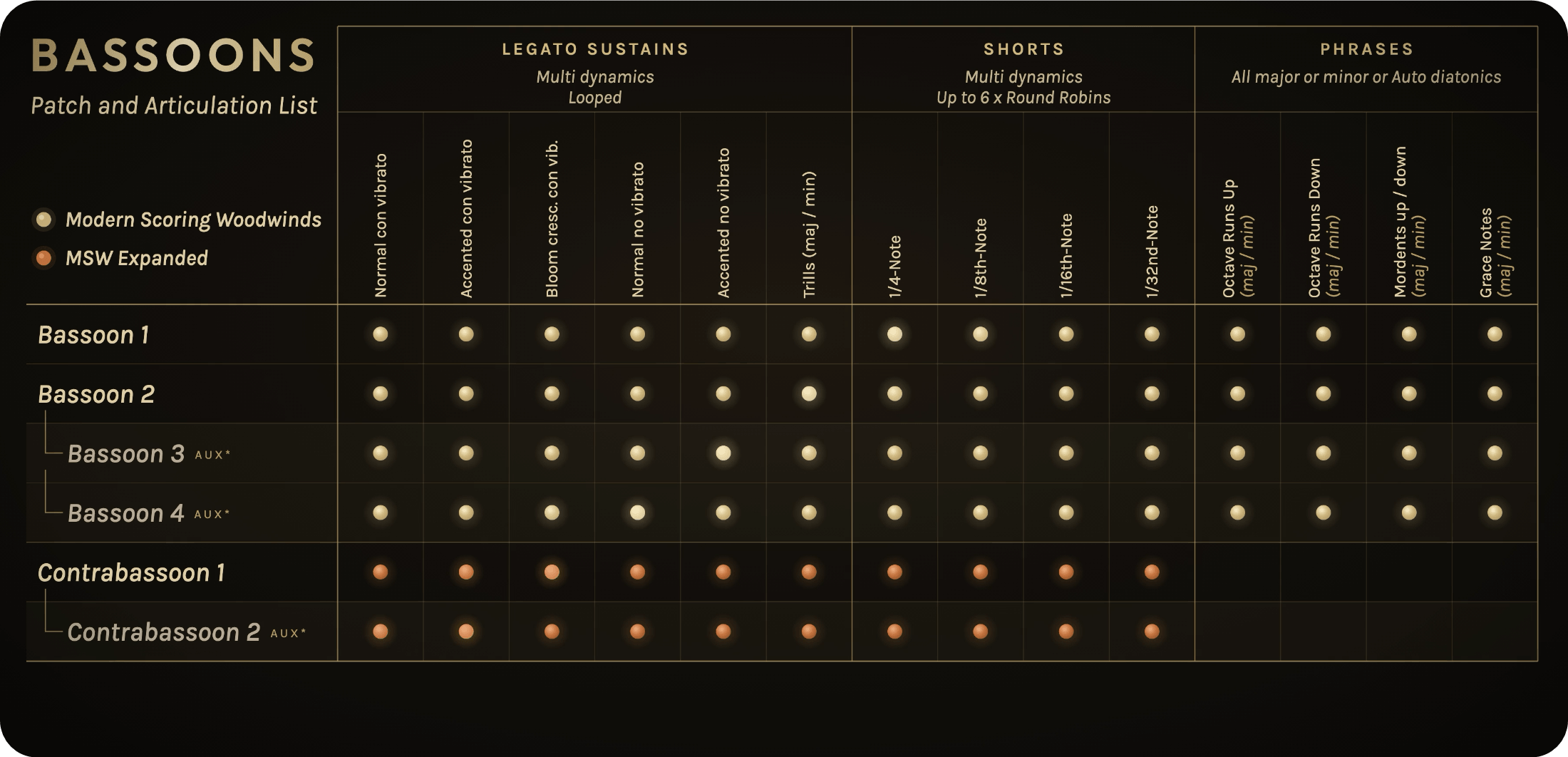
Microphone Examples
Modern Scoring Woodwinds features meticulously captured close, stage, and surround mics so you can shape your mix exactly how you want.
The examples below use our Ensemble patch with short articulations to clearly demonstrate the ambience and character of each microphone perspective: Close, Stage, and Surround mics. We are also including the Default Audiobro mix, which primarily uses the Stage microphones combined with our user-adjustable convolution reverb (IRs). This is the default mix used in our patches. In the examples below, the Ensemble patch automatically layers the appropriate instruments based on pitch for a natural orchestral sound.
FEATURES
WW Ensemble Patch
An Entire Woodwind Section. One Powerful Patch!
Why spend time juggling individual instruments, managing their ranges, layering sounds, and balancing a woodwind section when we’ve already done the heavy lifting for you? The WW Ensemble Patch brings an entire orchestral woodwind section together in one powerful, playable instrument, with all available articulations at your fingertips.
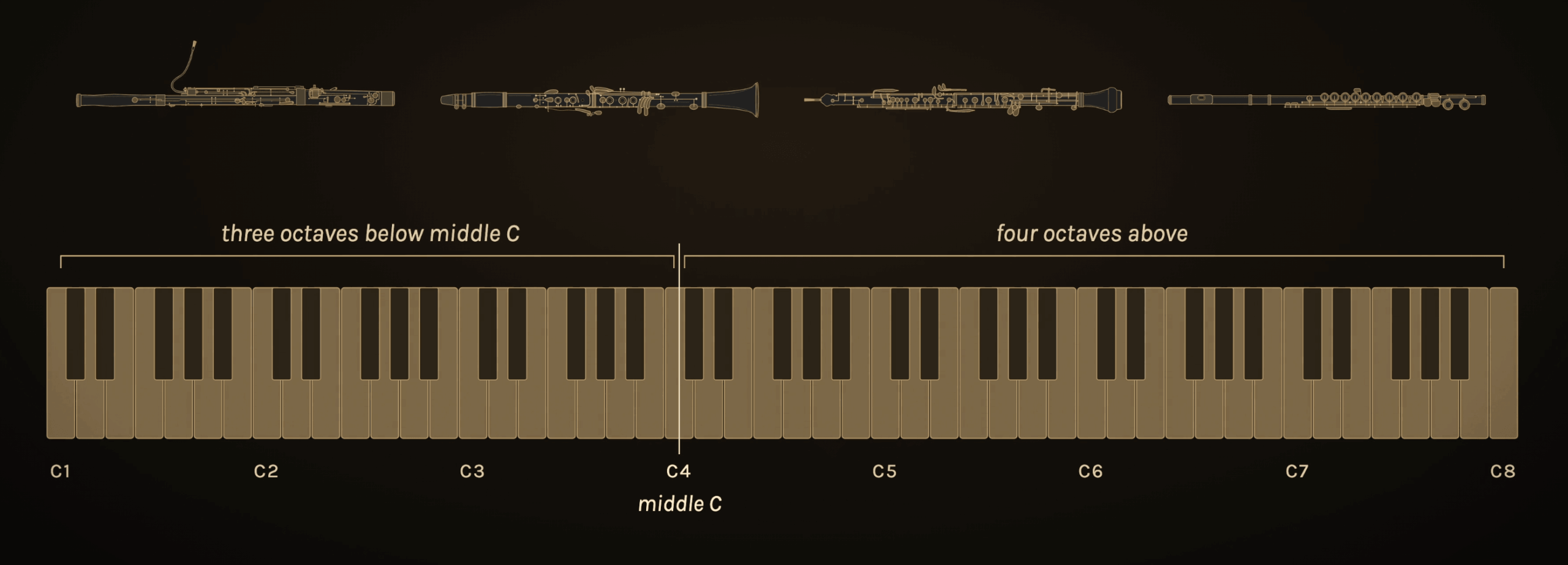
Spanning an impressive seven-octave range, the Ensemble Patch automatically layers and blends the appropriate instruments according to their natural playing ranges, with two independently playable divisi sections for even greater flexibility. From expressive melodic passages to rich, full-bodied orchestral textures, it’s designed to make composing intuitive and effortless.
Just play, compose, and let the music flow.
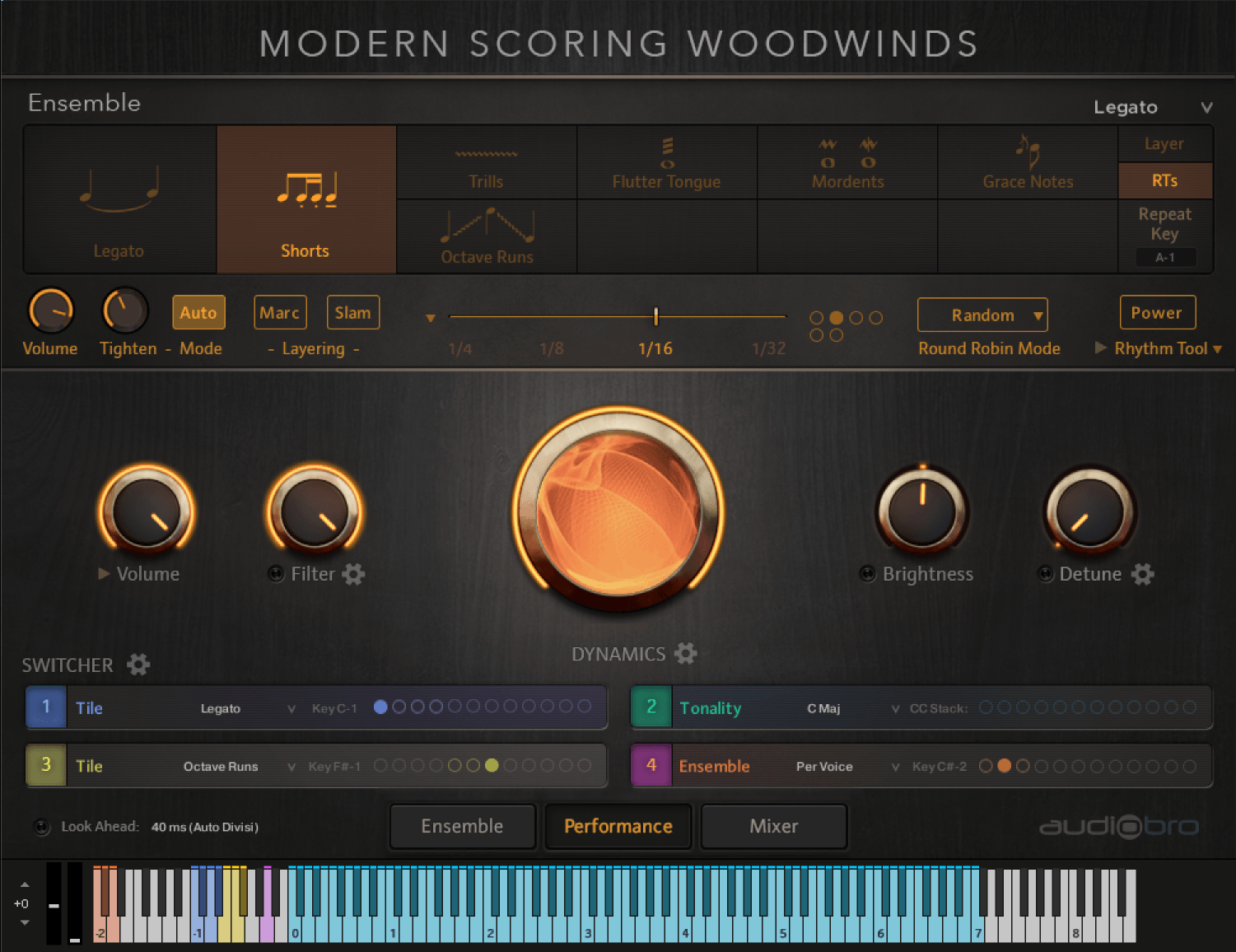
Legato & Sustains
Control Legato and Vibrato with ease and dial in the legato settings that suit you best. Here are the vibrato and Legato On/Off controls:

Watch how easy it is to play with the legato settings – here they are controlled by CCs. Or use “Auto” mode, which can change the settings based on how fast you are playing.
Auto Divisi
Audiobro’s Auto Divisi is a feature that distributes your chord tones to the appropriate sections giving you a much more realistic and balanced sound than other traditional libraries. Simply play a line or chords and let our engine do all the rest for you.
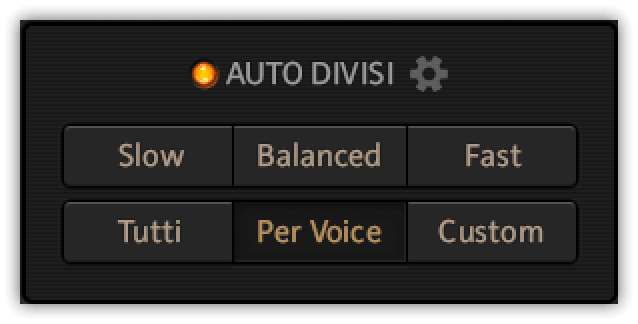
If you are not familiar with our Auto Divisi, check out the video below. It’s much easier to see how it works. We understand that the video below is a Genesis video, but the engine is relatively the same:
Look Ahead
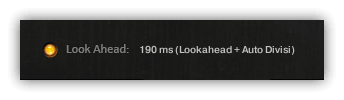
Let Look Ahead handle the timing.
Real musicians anticipate transitions so each note lands on time. Look Ahead does the same for legato transitions and short articulations, keeping your performances natural and rhythmically precise.
Enable it, apply the displayed negative track delay, and allow playback lead-in before the first note. MSW handles the timing adjustments so your MIDI stays on the grid—and you can focus on composing instead of nudging notes.
The video below demonstrates Look Ahead using our Genesis Children’s Choir, but the controls and functionality in Modern Scoring Woodwinds are nearly identical.
Ensemble and Stage
The Ensemble page is where the Stage and Audiobro’s coveted Auto Divisi and Delay & Humanization (DNH) features reside. Here you can choose and place your ensembles on our virtual stage, and our Auto Divisi will intelligently cater to your choices.
Some of the Ensemble Page’s main features include:
- Auto Divisi automatically adapts to your ensemble choices
- 52 ambiance presets using exclusive Audiobro IRs
- X/Y pad for easy placement of ensembles
- Independent volume, width, and pan per ensemble
- Adjustable Stage amounts for each microphone
- Auto-purge samples from ensembles that are not being used on stage
The Switcher
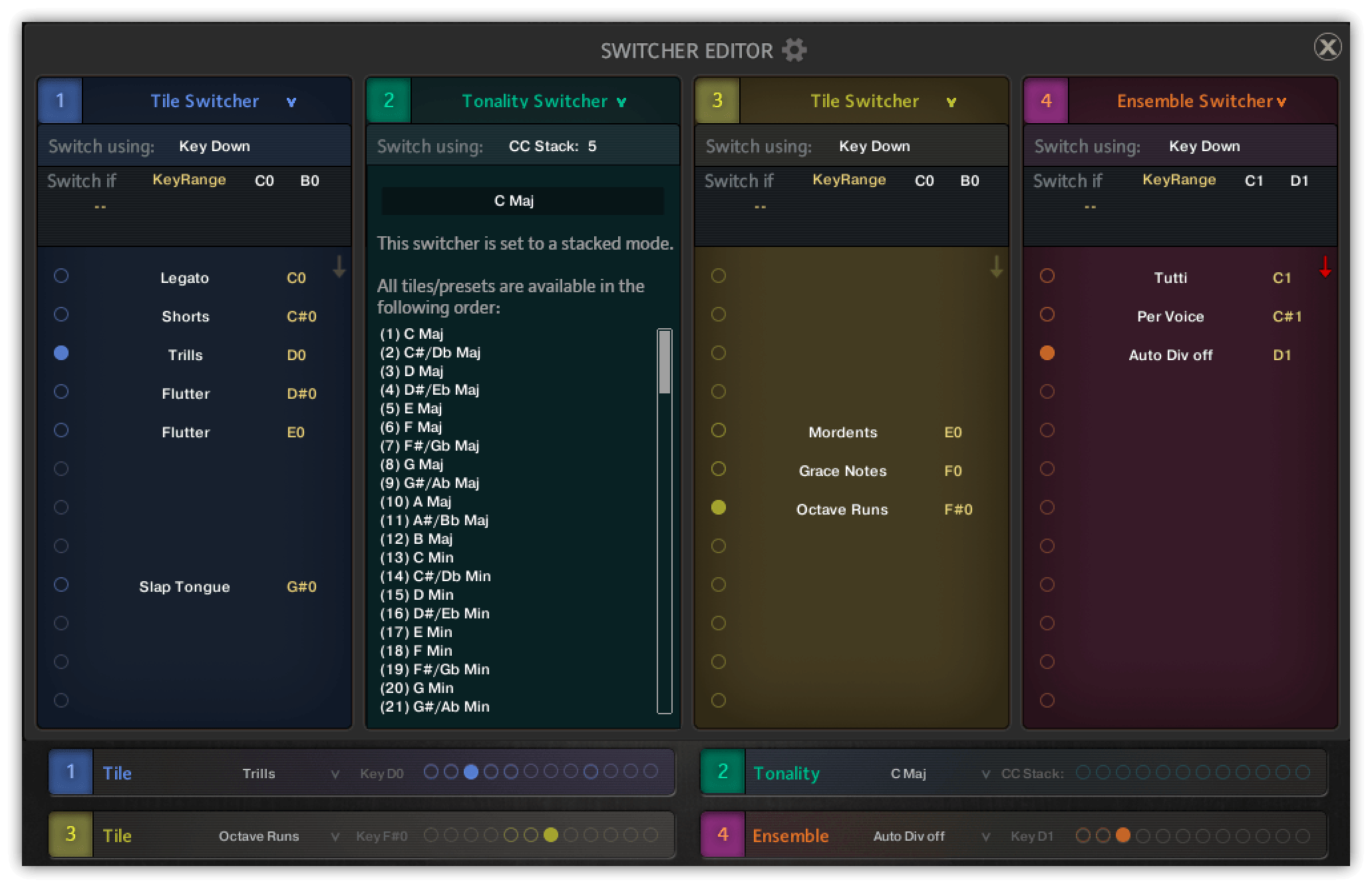
The Switcher is Audiobro’s advanced way to switch Phrases, Mixes, and Ensemble presets in a highly customizable, intuitive way. There are 2 views for the Switcher: the Basic View and the Advanced Editor. The Basic View is always visible from the performance page, and here you can set basic switching. The Advanced Editor is where you can set more complex and creative switching and do things like layering and CC switching.
Here are some of the Switcher’s features:
- Keyboard switching (the traditional way to key switch)
- Continuous Controller (CC) — switching using CCs
- Velocity switching — use keyboard velocity information coupled with logic to help make key switches
- Layered key switching
We understand the video below is for Genesis, but the same principles apply to Modern Scoring Woodwinds:
The Mixer
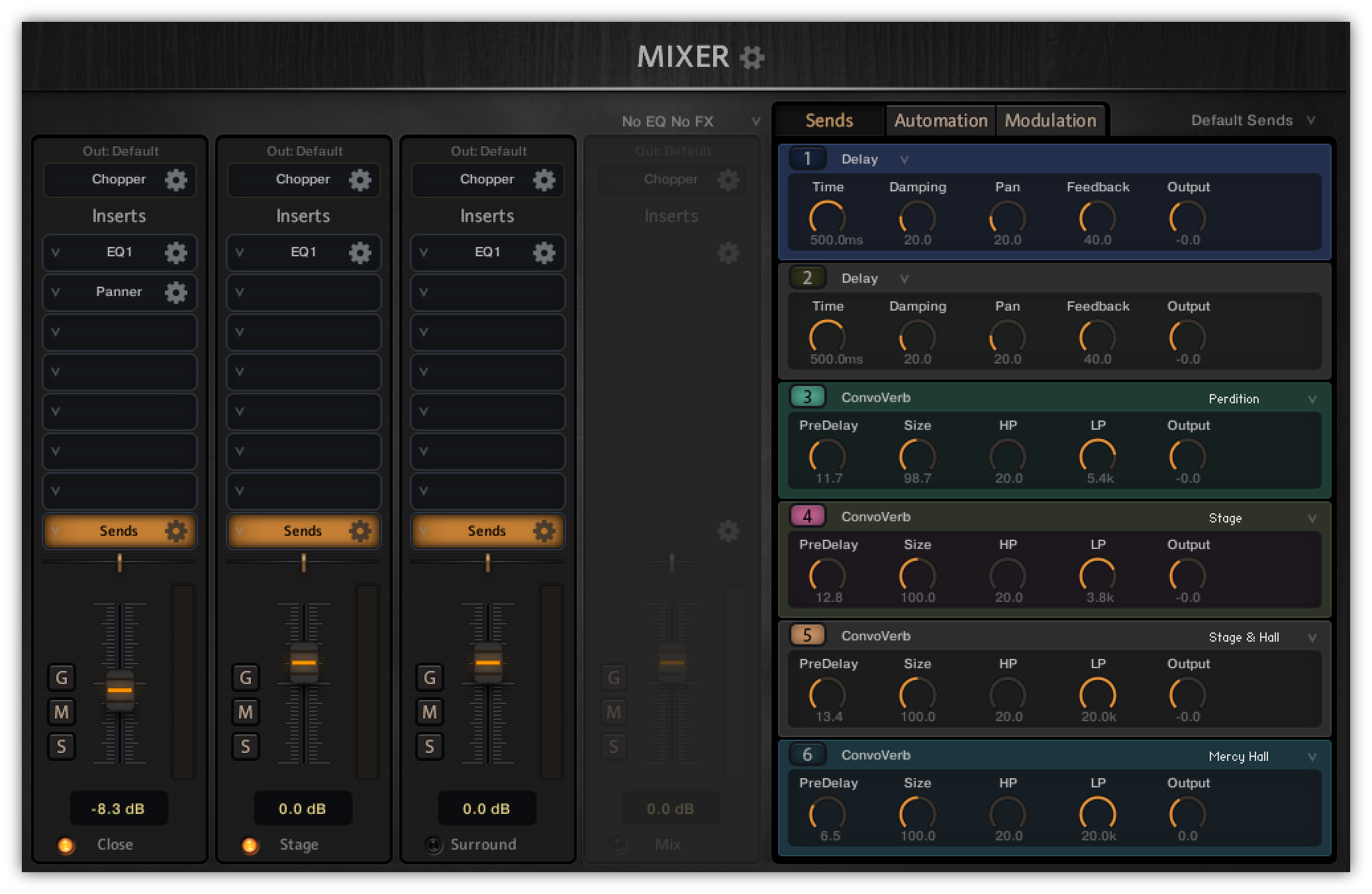
Audiobro’s new Mixer engine features extensive Modulation, Automation, and Effects Sends sections that allow you to tailor your sound in compelling ways while keeping things simple and intuitive.
Our new Mixer has advanced features like:
- 20 key switchable Mixer snapshots
- 3 microphone mixes: Close, Stage, Far
- 7 inserts per channel
- 28 Effects plugins
- Over 50 filters to choose from
- Put any effects or filters in any order in our Insert slots
- Assign MIDI CCs to a plugin Effect parameter
- Modulation Tables to create compelling sonic landscapes
- Chopper — rhythmically stutter any channel to your specifications
A List of Additional Features
Tightly integrated with your favorite DAW
With our included DAW Integrations you can easily control advanced articulation switching directly in your MIDI editors.

Integration is included for Logic Pro, Cubase, Nuendo, Studio One, Digital Performer, Reaper
* Can be used in conjunction with key switching or by itself.
DAW integrated articulation switching for Logic, Cubase , Performer, S1, and Reaper!
DAW Integration
Seamlessly switch articulations in real-time by mapping virtual instrument expressions directly into your favorite DAW’s workflow—no key-switch memorization needed.
Shape your short articulations with real-time playing analysis or direct CC control.
Controlling Shorts
Let the engine automatically choose the ideal short articulation for your playing speed—or take direct control with a CC. The choice is yours.
Use Look Ahead to achieve natural MIDI timing without tedious manual editing.
Look Ahead
Look Ahead saves you time by anticipating upcoming notes,
automatically aligning transitions and attacks,
and reducing tedious MIDI editing.
System Specifications
 Modern Scoring Woodwinds Library Sizes
-
- Modern Scoring Woodwinds: 55 GB of lossless compressed audio files (approximately 106 GB of WAV recordings).
- Modern Scoring Woodwinds Expanded: 16 GB of lossless compressed audio files (approximately 31 GB of WAV recordings).
- MSW Complete (includes MSW and MSW Expanded): 71 GB of lossless compressed audio files (approximately 137 GB of WAV recordings).
NOTE: Once successfully installed, please make a safe backup of the library for future reference. There is a $9 server cost to re-download all your owned libraries.
Supported Interfaces:
-
-
- Stand-alone, VST3®, Audio Units(AU)™, AAX®
-
 Minimum System Requirements:
-
-
- Requires Kontakt Player 8.8.0 or later. Click here to download the latest free version of Kontakt Player.
- Windows — Windows 10 or Windows 11 (latest service pack), Intel Core i5 or equivalent CPU, 8 GB RAM (over 16 GB recommended – the more RAM, the better)
- Mac — Mac OS 13, 14, 15 (latest update), Intel Core i5 or equivalent CPU, 8 GB RAM (over 16 GB recommended – the more RAM, the better)
-
* NKS is a registered trademark of Native Instruments GmbH.
KOMPLETE KONTROL AND NKS2
The Scoring Series integrates seamlessly with Native Instruments’ Komplete Kontrol software and NKS/NKS2* ecosystem. Control the most important features of these libraries directly from NI hardware and using your sequencer’s device automation. We’ve made it quicker and easier to find sounds – browse and load all KOMPLETE Instrument presets from a single plugin. Knobs will display all the relevant controls on NI’s LED displays.
Learn more about NKS here: